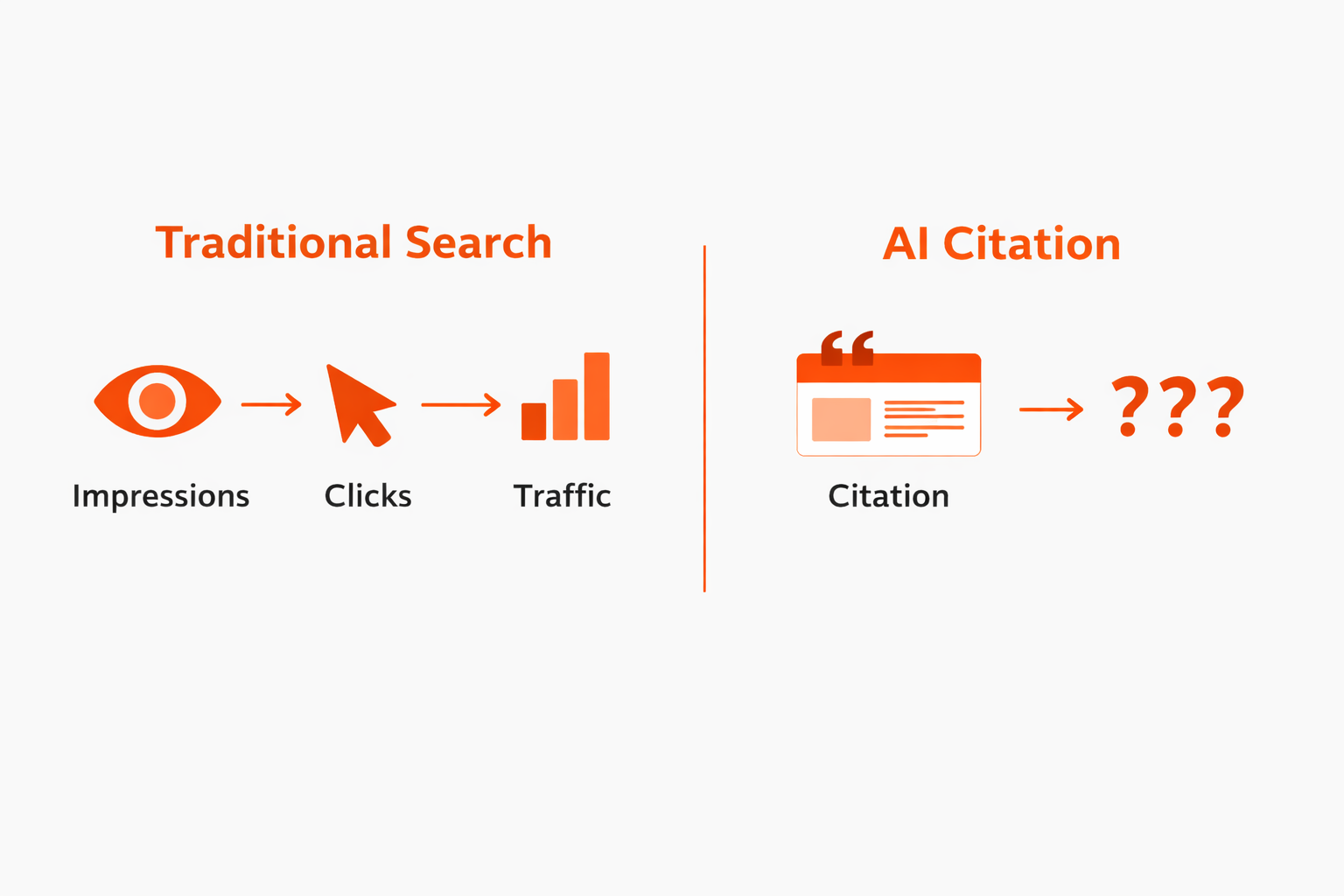
We finally have data directly from an AI platform. It's not everything we want, but it's better than nothing. And it’s important to get our heads around it so we can set expectations with clients and note changes over time.
In February 2026, Microsoft rolled out the AI Performance report inside Bing Webmaster Tools as a public preview. For the first time, you can see how often your website content gets cited in AI-generated answers, with visibility into which URLs are being referenced, how often, and how that changes over time.
Here’s a walkthrough of what it shows, what it doesn't, and what stood out to me the first time I dug into it for a client.
What it is & what it isn't
The most important thing to understand right away is that this report only measures visibility. There are no clicks. NO CLICKS. It only tracks citations, meaning how often your content shows up as a visibly cited source in AI-generated responses.
The sources it covers are Microsoft Copilot (including Copilot directly and Bing's version of AI overviews on Edge) and what Microsoft calls "select partner integrations." Bing doesn’t say who those partners are anywhere in their documentation or blogs.
This is also not Google. Not AIO, not AI Mode, not Gemini, none of it. Just Bing, Copilot, and those unnamed “partners”.
First look at the AI Performance dashboard in Bing WMT
The report is pretty straightforward. You've got date options at the top: 7 days, 30 days, 3 months, and a custom date picker. The max lookback right now goes to November 1, 2025.
There are two metrics in the chart:
Total Citations shows how many times your site was cited as a source in AI-generated answers during the selected time frame. This is probably the closest thing to an overall AI visibility score, which is the most immediately useful insight.
Average Cited Pages is the daily average of unique pages from your site that were referenced. I don't find this one particularly useful on its own yet.
Below the chart is a table with grounding queries and the specific pages being cited. This is the part that needs the most careful reading.
Grounding queries are not user queries
This is super important to understand.
Grounding queries are not what actual people are typing into Bing or Copilot. They're shorter, topical queries that the AI generates in the background to retrieve information from the live web. AI systems use grounding queries to make sure generated answers aren't purely based on old training data and don't drift off topic.
So it's more helpful to think of grounding queries as topics, not literal search terms.
When you're looking at them, the questions worth asking are:
- Are these relevant to my business?
- Does this make sense?
- Is there something important to us that we're not getting any visibility for?
- Have there been any big changes, like an important topic declining in frequency or a new topic showing up?
Filtering the data
About a month after the AI Performance report launched in Bing WMT, they added a search tool above the table. You can use it to filter for grounding queries or pages that contain the term you search for.
If you click on a grounding query, two things happen: it adds a query filter bubble to the top of the report and jumps you to the timeline chart so you can see how the filtered-for queries are trending. It also filters the pages half of the table, so you can see which URL(s) are cited for that grounding query.
It works the other way, too: click on any URL in the pages half of the table to see the grounding query/queries it's associated with, or how that URL is trending over time in AI citation visibility.
Pages are the URLs AI systems cite in their responses
The other tab in the table is “Pages.” It’s a list of URLs and how many times each one was cited in an AI answer.
Here’s how I approach this list:
- Are the site’s most important pages getting cited?
- Are there any surprising URLs in this list?
- Do the most commonly cited URLs align with the most common grounding queries?
Also worth knowing: multiple grounding queries can be associated with a single URL, and a single URL can be associated with multiple grounding queries. It's not one-for-one.
Limitations
If you want to filter for a specific term, compare time periods, or drill into a subfolder, you have to download the data into Excel or a CSV and do your filtering there. For anyone used to Google Search Console's UI, this is going to feel clunky.
Microsoft has also noted that parts of the dataset are sampled and may be refined retroactively as more data is processed. Keep that in mind before drawing conclusions from small movements.

Again: there's no click data. You can see that your content is being cited, but you can't tell whether anyone clicked through to your site from that citation. Microsoft has hinted that more data is coming throughout 2026, but right now it's visibility only.
In practice: What I noticed first
When I pulled Bing’s AI performance data for a client, a B2B company in a specialized industrial space, a few things jumped out.
The chart followed a typical B2B pattern. Dips on weekends, a lull during the winter holidays, and overall pretty steady. No major swings, which is a solid starting point.
When I exported everything and categorized the grounding queries by topic, the overwhelming theme (86%) was their core product category. Their most comprehensive educational page, a "what is this and how does it work" explainer, had 10x the citations of the second-most-cited page. That page has the most depth, the clearest structure, and it's been around the longest. Makes sense.
The next category was general queries about related technology and alternative approaches. When I checked the search volumes, people just search for the main product type way more than the alternatives. Not surprising the citation volume followed the same pattern.
The third category was made up of problem-related queries with mixed search intent. The higher-volume grounding query variant had some industrial results but was mainly geared towards everyday folks looking for residential solutions. Our client had more citations for the lower-volume-but-better-intent grounding query variant, so it was good to see AI doing a good job matching the website content to the right search intent.
Since the data looked stable over the entire max lookback period, I didn't do a period-over-period comparative analysis. But as we accumulate more months of data, that's the plan.
What about Google?
Google has confirmed that AI Overview and AI Mode data gets rolled into Google Search Console's regular performance reports. So AI visibility is in the mix with your traditional organic impressions and clicks, and there's no way to separate how much is from AI-generated results versus traditional organic. They haven't announced any plans to break that out, and a rumored AI Overviews filter turned out to be a fake screenshot that John Mueller debunked pretty quickly.
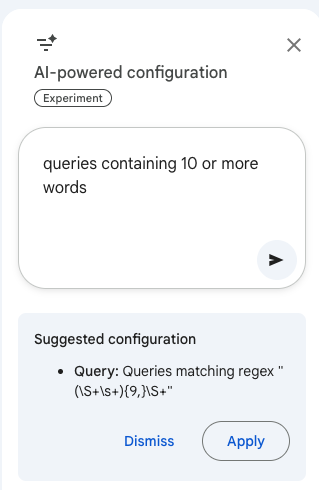
If you have enough query volume in GSC, you can apply a regex to only look at long queries (like 10 words or longer). The new AI-powered configuration tool in GSC is helpful here: just type in “queries containing 10 or more words” and it will give you a regex so you don’t have to write it or track one down. Some of those extra-long queries can look likely to be from an AI Mode search, but there’s no way to know for sure.
Hopefully Bing putting this report out there creates some pressure. We need AI visibility and performance data from Google, too. My guess: they don’t want to share it because it will be obvious that as AI-generated response visibility grows, clicks shrink.
What this means going forward
This is just a starting point. More value will build over time. When we can compare quarter over quarter, or watch how new content impacts citation activity, or notice when a competitor starts showing up for topics we used to own, that's when we can move beyond establishing a baseline.
For now, here's what I'd suggest in terms of making best use of what we have so far:
Get verified in Bing Webmaster Tools if you aren't already. It takes a few minutes and now there's a real reason to have it. You can find the report at bing.com/webmasters/aiperformance once you're logged in.
Do an initial export of the data table and sort your grounding queries into topic buckets. This quick exercise lets you see what Bing’s AI thinks your site is about, and which topics you’re an authority on. If it doesn't match your business priorities, you've found your first actionable insight.
Double down on what’s working. If grounding queries show strong visibility for a certain topic, expand coverage of related areas to be an even more valuable resource for that subject.
Look at your most-cited pages and ask yourself why. What do they have in common? Clear headings? Thorough coverage? Fantastic structure? Consistent terminology? Lots of links? Freshness? Original data? Actual expertise? Patterns from your most-cited pages should inform how you create and optimize content going forward. Especially if you’ve got an important page you believe should be getting cited, but isn’t.
Start tracking. Even if it's just a monthly export. You'll be glad you did in six months when you have something to compare against. Who knows if Bing WMT will keep 18 months of historical data (like GSC does) or if it will be shorter. We also don’t know how the forewarned “refinements as additional data is processed” might change things.
This covers Bing and Copilot's ecosystem only. Not Google, not ChatGPT, not Perplexity, not Claude (those probably aren’t the secret partners). But it's the clearest window so far into how AI systems are using your content, so squeeze every drop you can from it.
<div class="post-note-cute">If you’re digging through Bing WMT or GSC and want a second set of eyes, this is the kind of work we do every day. Happy to talk it through.</div>